

API Keys: Creation and Setup
The API key allows you to connect trading bots, terminals and analytics to your ABCEX account via REST and WebSocket.
What is an API key
An API key consists of a public key (publicKey) and a secret key (secretKey). It replaces your login and password for programmatic access: the public key is included in the request header, and the request is signed with the secret key. This allows a bot or external service to act on your behalf without knowing your account password.
secretKey is displayed when the key is created and is not stored on the exchange servers. It cannot be recovered, even through support. If you did not save it, delete the key and create a new one.
All endpoints, the signature formula, WebSocket channels, and error codes are documented at abcex.readme.io. The Read Documentation link on the API Keys page opens the same resource.
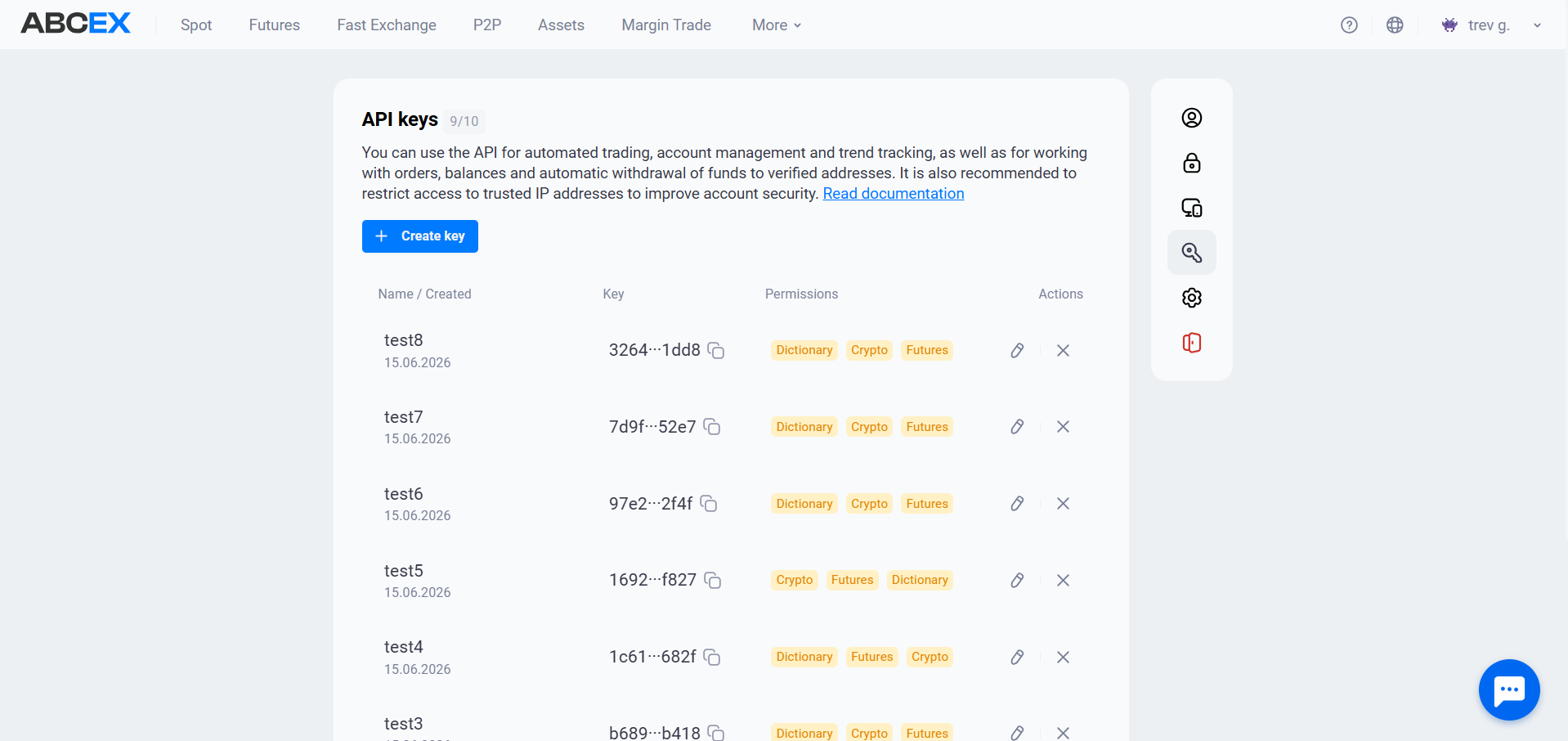
You can have up to 10 active keys at the same time. The counter is visible next to the section title. You can create or delete a key only while fully signed in with your password and 2FA. An API key never has this permission, so even a leaked key cannot be used to create another one.
How to create a key
- Profile — Section “API keys”
- Create a key - Come up with a name
- Rights and IP - By category
- Save secret - Shown once
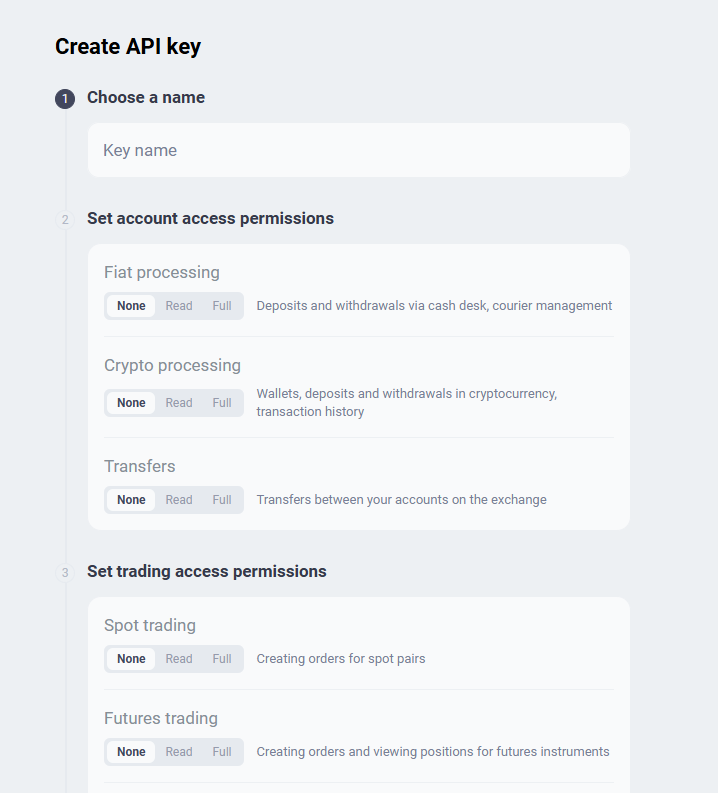
In the creation form, permissions are divided into two groups: account operations (Fiat Processing, Crypto Processing, Transfers) and trading (Spot Trading, Futures Trading). Every category defaults to None. Enable only what your bot needs.
Key creation is confirmed with a 2FA code. Immediately after this, the exchange will show secretKey once - copy it before you close the window.
Key permissions
ABCEX permissions are not controlled by a single read/trade/withdraw switch. You select one of three access levels for each category, so a bot can have full spot trading access without any withdrawal permission.
- No — The category is not available for the key. This is the default - leave whatever the bot doesn’t need.
- Reading — View only: balances, orders, history. Nothing can be changed or withdrawn.
- Full — View data and perform operations: create or cancel orders, transfer funds, and submit withdrawals.
A level is selected for each of the categories:
| Category | What it covers | Requires an IP allowlist |
|---|---|---|
| Spot Trading | Creating and canceling orders for spot pairs | No |
| Futures Trading | Orders and positions on futures instruments | No |
| Transfers | Transfers between your accounts on the exchange | No |
| Reference Data | Instruments, tickers, and currency codes | No |
| Fiat Processing | RUB deposits and withdrawals through a cash desk | Yes |
| Crypto Processing | Wallets and cryptocurrency deposits and withdrawals | Yes |
| P2P | Transactions on the P2P platform | Yes |
Fiat Processing, Crypto Processing, and P2P are the only categories that move money outside the account. Until the key has an IP allowlist, these categories can only be set to None. This is an exchange rule, not an interface limitation.
Whitelist IP and key lifetime
An IP allowlist is more than a security recommendation: it affects both the key's lifetime and the permissions that can be assigned to it.
| Without an IP allowlist | With an IP allowlist | |
|---|---|---|
| Key lifetime | 90 days | Indefinitely |
| Where requests are accepted | From any IP | Only from the specified |
| Trading, transfers, reference data | Available | Available |
| Deposits, withdrawals, and P2P | Not available | Available |
The rule is simple: a production bot should run from a static IP added to the allowlist. The key then stops expiring, and all required permissions can be granted. A key without an allowlist is suitable for temporary tasks and read-only analytics.
A key without an IP allowlist expires exactly 90 days after creation, after which every request returns api key expired. No advance warning is sent, so either configure an allowlist or set a reminder to replace the key.
Key Security
Do not share secretKey, commit it to a repository, or write it to logs. If you suspect a leak, delete the key immediately in your account and create a new one. A deleted key stops working at once.
- Grant the minimum permissions. A statistics bot needs only “Reading” access. A trading bot generally does not need deposit or withdrawal permissions.
- Each task has its own key. Separate for the bot, separate for analytics. If one has to be recalled, the rest will continue to work.
- Limit by IP. Then they won’t be able to use even a leaked key from someone else’s server.
- Start with “Reading”. Test the bot's logic with read-only access and minimum amounts before granting “Full” access.
Entering a key into a third-party service grants that service every permission assigned to the key. Grant only the minimum required permissions and add only that service's IP addresses to the allowlist.
If the key doesn't work
Almost all API key failures return status code 401, with the specific reason in the response body.
| Exchange response | Meaning |
|---|---|
ip address not in whitelist |
The request came from an IP address that is not in the key's allowlist. The server address may have changed, or the provider may assign dynamic addresses. |
api key expired |
The key has expired — 90 days for a key without an allowlist. Configure an allowlist or create a new key. |
timestamp expired |
The clock on your machine differs from the exchange by more than 30 seconds. Synchronize it via NTP. |
insufficient permissions for this route |
The key does not have enough level in the required category - for example, it is “Reading” where “Full” is required. |
invalid signature |
The request signature did not match - see the checklist below. |
api key not foundapi key is not active |
The key has been deleted or blocked, or publicKey was copied with an error. |
invalid API key format |
publicKey is not 64 hex characters - usually part of the line is lost during copying. |
Write the method in uppercase. The signed path must include the query string and exactly match the URL. The body must be byte-for-byte identical to the request body; do not serialize it twice. Use a real line break as the delimiter, not \r\n or a literal escape sequence. Pass secretKey to HMAC as a hexadecimal string without decoding it to bytes. The timestamp in the signature and request header must match. The complete formula and Node.js and Python examples are available in the API documentation.
Frequently asked questions
You can have up to 10 active keys. The counter next to the “API Keys” section title shows how many are currently in use. If you reach the limit, delete unused keys.
You cannot recover it. The secret key is displayed only once during creation and is not stored on the exchange servers, so support cannot restore it. Delete the key and create a new one.
There are two common reasons. A key created without an IP allowlist expires after 90 days and returns api key expired. If an allowlist is configured but the server's IP address has changed, the response is ip address not in whitelist. The exact reason is always included in the response body.
Categories that move money outside the account—Crypto Processing, Fiat Processing, and P2P—require an IP allowlist. While the key has no allowed addresses, these categories can only be set to None. Add IP addresses to enable the other permission levels.
No. Keys can be created or deleted only after a full account sign-in with a password and 2FA. This is intentional: even if an API key is leaked, it cannot be used to create another one.
The client must keep the connection alive by sending {"method":"ping"} and receiving pong. The recommended interval is 20–25 seconds. If the client sends nothing for about 30 seconds, the server closes the connection.
Use the reference-data endpoints: networks and currencies — GET /api/v1/currency-network/list; assets — GET /api/v2/exchange/client/asset/list; spot pairs — GET /api/v2/exchange/public/asset/instrument/spot/list. The key needs only “Reading” access in the “Reference Data” category.
See abcex.readme.io. The “Read documentation” link on the “API Keys” page opens the same resource, which covers authentication, request signing, all endpoints, and WebSocket channels.