

Cash and ABCEX Offices
ABCEX is developing a network of offices across Russia where you can deposit or withdraw cash rubles and arrange large OTC desk trades.
How to deposit cash
- Create a request — Assets → RUB → Deposit → Moscow City Cash Desk
- Confirm — Submit the draft request for processing
- Visit the office — Instructions are sent by email; bring your passport on your first visit
- Deposit cash — The funds are credited to your account
Assets → RUB → Withdrawal → Moscow City Cash Desk. After confirming your request, come to the office and receive cash. For questions, contact @ABCEX_TechSupport.
The cash desk accepts cash rubles only — other currencies are not supported.
When creating a request, select the cash desk, enter the amount and your contact details, and specify who will bring the cash: you or a trustee. If a trustee is coming, enter their full name exactly as shown in their passport — this information is used to issue a visitor pass at reception.
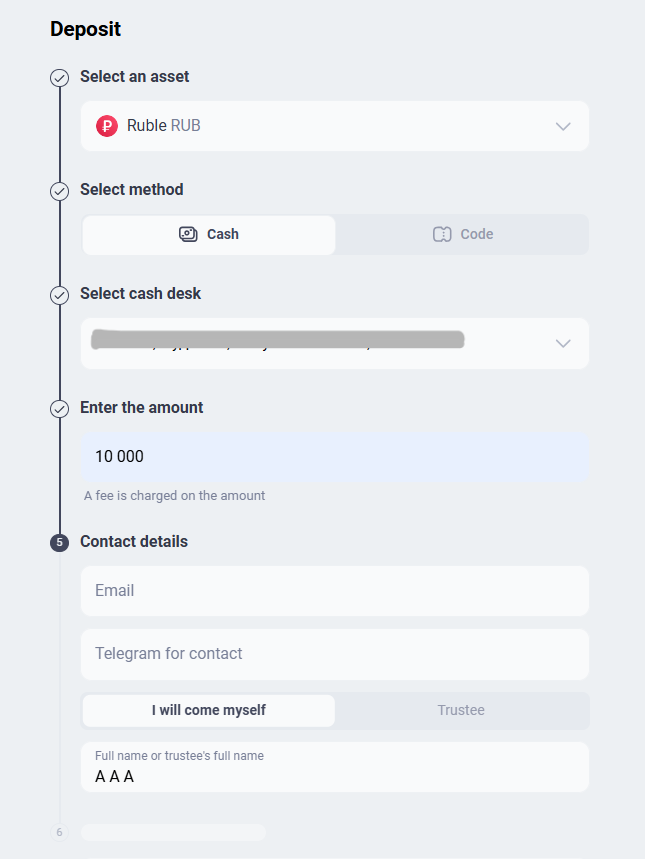
The final step is to confirm the transaction with a two-factor authentication code. You receive the code through the method configured in your profile: Google Authenticator, Telegram, or email.
ABCEX office in Moscow
- Moscow · 12 Presnenskaya Embankment, Vostok Tower (Federation), 16th floor — Opening hours: 24/7 · Deposit fee: 0% · Withdrawal fee: 0% · Minimum amount: 5,000 ₽
Regional partner offices
Arrange a transaction through @abcex_pro_bot or the Google form on the website. To open a partner office, submit the form on the website.
The current list of offices is on a separate page
The network is constantly expanding, so cities, addresses, fees, minimum amounts, and opening hours are listed in one place — on the offices page. This keeps the list up to date.
Request Statuses
A deposit or withdrawal request moves through several statuses. You can track it in Active Operations.
- Draft — You reached the confirmation step but closed the window without selecting Confirm. The request has not been submitted.
- Pending — The request has been created and is awaiting processing. At this stage, you can still cancel it using the Cancel button.
- Processing — The request has been accepted for processing.
- Completed — The operation is complete. The deposit amount is shown in green with a + sign; the withdrawal amount is shown in black with a − sign.
- Canceled — The request was canceled either by you at an early stage or by the exchange. Contact support if the reason is unclear.
The request card shows everything needed for the visit: request number, visitor's full name, cash desk address, and opening hours.
OTC desk trade
An OTC desk trade is a direct exchange of assets between a buyer and seller at the exchange office. It is intended for large amounts: you hand over cash and receive cryptocurrency in your wallet under staff supervision.
- Safe - Everything happens in the office, with exchange employees.
- Fixed rate - The price is agreed upon in advance - there are no hidden fees, and a large amount does not move the market rate.
- How to submit — Create a request through the Telegram bot as described in “Exchange Through the Telegram Bot.” Then visit the office, hand over the cash, and receive cryptocurrency in your wallet.
OTC desk trades are carried out only at the Moscow office.
Frequently asked questions
A large order can move the order book price against you. In an OTC desk trade, the rate is fixed in advance, so you know the exact amount without affecting the market.
No. The cash desk handles cash rubles only. Deposit cryptocurrency through the Tron or Ethereum networks as described in “Cryptocurrency Deposits and Withdrawals.”
Yes. When creating a request, select Trustee in the Who Will Visit field and enter the trustee's full name exactly as shown in their passport. This information is used to issue a visitor pass.
Yes, while it has the Pending status: select Cancel on the request card. Once processing has started, contact support to cancel it.